
|

How to make Email Auto Responders

* You can use autoresponders to automatically send a message back to anyone who sends an email to a specified account. Possible scenarios in which you may use autoresponders include when you are on vacation, unavailable, or if you have a generic message that you wish to send from a support email address. To make Email…

* You can use autoresponders to automatically send a message back to anyone who sends an email to a specified account. Possible scenarios in which you may use autoresponders include when you are on vacation, unavailable, or if you have a generic message that you wish to send from a support email address.

To make Email Auto Responders :

1- go to your cpanel link (your domain/cpanel) .

2- Click on Auto Responders in the Mail section .
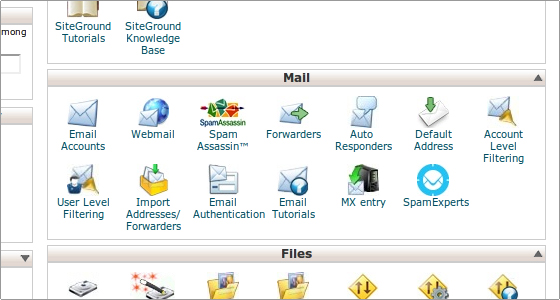
outo

3- click on the Add Auto Responder button .

click forw

4- Enter the email address you wish to send the auto-responses from, the name you wish the message to come from, the subject of the auto-response email, select a character set from the drop-down menu and choose whether the message will be displayed in the HTML format. Finally, type in the message in the Body field .
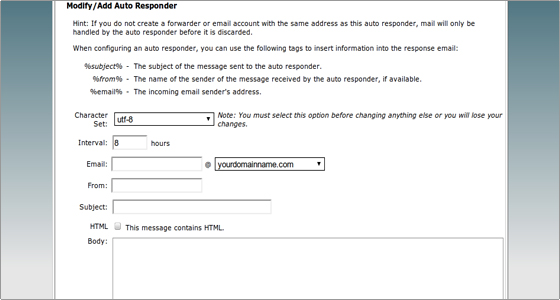
click forww

5- Click on the Create/Modify button to create the auto-responder .


Similar Posts

  • |

    How to Create Subdomains

    * Subdomains are URLs for different sections of your website. They use your main domain name and a prefix. For example, if your domain is “domain .com”, a subdomain of your domain might be “support.domain .com”. To Create Subdomains : 1- go to your cpanel link (your domain/cpanel) . 2- Click on Subdoamains  on Your Clint Area…

  • |

    How to make Email backup

    * Backups allow you to download a zipped copy of your entire site or specific parts of your site, such as your home directory, databases, email forwarder configuration, or your email filters configuration. The server does not automatically schedule these backups. If you wish to use scheduled backups, contact your service provider. To make Email backup…

  • |

    How to Delete Spam

    * Apache SpamAssassin™ is a mail filter that identifies spam. It is an intelligent email filter that uses a diverse range of tests to identify unsolicited bulk email, more commonly known as spam. These tests examine email headers and content to classify email with advanced statistical methods. More information is available at spamassassin.apache.org . To filter and…